4.8 KiB
Configure kolla
Edit the ansible inventory entries to set credentials, networks and roles per host class (as placed in the /etc/hosts file). The inventory follows ansible convention to allow per host configuration with less reliance on the central ansible.cfg, aiding portability and simplifing configuring nodes with heterogeneous hardware. Replace the following sections at the top of the file, this is where node classes control/network(er)/compute/storage/deployment hosts are defined, the rest of the inventory entries control placement of the services on these main classes. The use of [class:children] allows us to stack role services and make nodes dual purpose in this small environment.
# enter the venv
# source /home/openstack/kolla_zed/bin/activate

nano -cw multinode

# These initial groups are the only groups required to be modified.
# The additional groups are for more control of the environment.
[control]
control1 network_interface=provider neutron_external_interface=provider neutron_bridge_name="br-ex" tunnel_interface=tunnel storage_interface=storage ansible_ssh_common_args='-o StrictHostKeyChecking=no' ansible_user=openstack ansible_password=Password0 ansible_become=true

[network:children]
control

[compute]
compute1 network_interface=provider neutron_external_interface=provider neutron_bridge_name="br-ex" tunnel_interface=tunnel storage_interface=storage ansible_ssh_common_args='-o StrictHostKeyChecking=no' ansible_user=openstack ansible_password=Password0 ansible_become=true

[monitoring:children]
control

[storage:children]
compute

[deployment]
localhost       ansible_connection=local

# additional groups
Test ansible node connectivity.
ansible -i multinode all -m ping
Populate /etc/kolla/passwords.yml, this autogenerates passwords/keys/tokens for various services and endpoints.
kolla-genpwd
Edit the global config file nano -cw /etc/kolla/globals.yml.
set the external horizon/control-API endpoint IP with the kolla_internal_vip_address variable. use prebuilt containers (no compile+build) with kolla_install_type. enable_neutron_provider_networks is used when we want nova instances to have an interface directly in the provider network
(kolla_zed) ocfadm@NieX0:~$ cat /etc/kolla/globals.yml | grep -v "#" | sed '/^$/d'
---
config_strategy: "COPY_ALWAYS"
kolla_base_distro: 'ubuntu'
kolla_install_type: "binary"	# now deprecated and not present in the config, did not seem to compile containers so assume binary by default
kolla_internal_vip_address: "192.168.140.63"
openstack_logging_debug: "True"
enable_neutron_provider_networks: "yes"
Deploy kolla
# enter the venv
source /home/openstack/kolla_zed/bin/activate

# install repos, package dependencies (docker, systemd scripts), pulls containers, groups, sudoers, firewall and more
kolla-ansible -i ./multinode bootstrap-servers

# pre flight checks
kolla-ansible -i ./multinode prechecks

# deploy
kolla-ansible -i ./multinode deploy
Post deployment
# enter the venv
source /home/openstack/kolla_zed/bin/activate

# install openstack cli tool
pip install python-openstackclient

# generate admin-openrc.sh and octavia-openrc.sh
kolla-ansible post-deploy

# source environment and credentials to use the openstack cli
. /etc/kolla/admin-openrc.sh

# check cluster
$OPENSTACK_CLI host list
$OPENSTACK_CLI hypervisor list
$OPENSTACK_CLI user list

# find horizon admin password
cat /etc/kolla/admin-openrc.sh

OS_USERNAME=admin
OS_PASSWORD=dPgJtPrWTx0whQhV8p6G2QaK4dI4fEFmIRkiPjuB
OS_AUTH_URL=http://192.168.30.63:5000

# the controller VIP exposes the external API (used by the openstack cli) and horizon web portal
http://192.168.30.63
Login to the Horizon dashboard
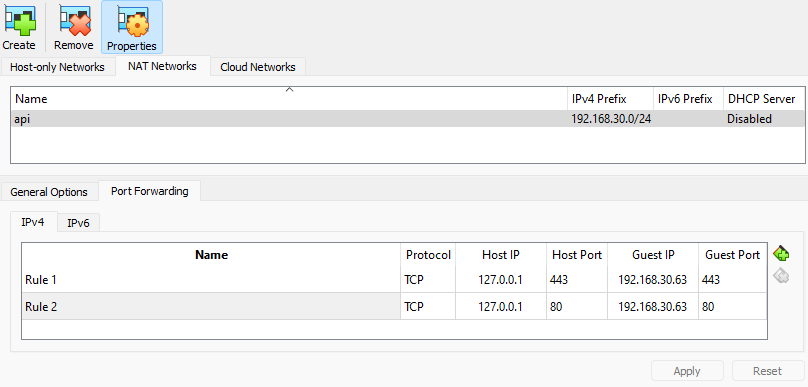
The dashboard is located on the API network, in this build the network resides in a VirtualBox SNAT network. Create a port forward to allow the workstation to access the dashboard http://127.0.0.1
Start/Stop cluster
# enter venv, load openstack credentials
source /home/openstack/kolla_zed/bin/activate
source /etc/kolla/admin-openrc.sh

# stop
kolla-ansible -i multinode stop --yes-i-really-really-mean-it
shutdown -h now # all nodes

# start
kolla-ansible -i multinode deploy
Change / Destroy cluster
Sometimes containers and their persistant storage on local disk can get borked, you may be able to "docker rm" + "docker rmi" on select containers for the broken node and then run a reconfigure to re-pull containers. Always run a mirror sync local registry with large deployments and pin container tags.
# reconfigure, not sure if this is effective with physical network changes owing to database entries?
kolla-ansible -i ./multinode reconfigure

# destroy
kolla-ansible -i ./multinode destroy --yes-i-really-really-mean-it